wordprss-smart-qoute disable
지금까지 내블로그는 복붙이면 가능하도록 만들어 졌다고 생각했다. 그런데 따라해보니 시작부터 에러가 발생하였다. 뭐지? 하고 보니 json 에서 쿼터가.. 이런식으로 작동하는거였다. https://www.fayazmiraz.com/disable-auto-curly-quotes-in-wordpress/ 이페이지를 참고하여 /wordpress/wp-content/plugins 경로에 disable-plugin-quotes.php 를 생성하고 아래와 같은 내용을 추가하여 주었다. [root@ip-10-0-0-12 plugins]# cat disable-plugin-quotes.php <?PHP /\* Plugin Name: Disable Smart Quotes Plugin URI: http://www.fayazmiraz.com/disable-auto-curly-quotes-in-wordpress/ Description: WordPress Plugin to Disable auto Smart (Curly) quote conversion Version: 1.0 Author: Fayaz Ahmed Author URI: http://www.fayazmiraz.com/ \*/ if( version_compare ( $wp_version, '4.0' ) === -1 ) { // To Disable Smart Quotes for WordPress less than 4.0 foreach( array( 'bloginfo', 'the_content', 'the_excerpt', 'the_title', 'comment_text', 'comment_author', 'link_name', 'link_description', 'link_notes', 'list_cats', 'nav_menu_attr_title', 'nav_menu_description', 'single_post_title', 'single_cat_title', 'single_tag_title', 'single_month_title', 'term_description', 'term_name', 'widget_title', 'wp_title' ) as $sQuote_disable_for ) remove_filter( $sQuote_disable_for, 'wptexturize' ); } else { // To Disable Smart Quotes for WordPress 4.0 or higher add_filter( 'run_wptexturize', '__return_false' ); }  이렇게 플러그인이 생성되고 활성화하면 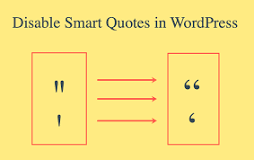 이증상이 사라진다.. 지금까지 내블로그에서 복붙안되셨던 분들께 사죄를..